Founding member Be one of our first 100 founding members — get in early, talk directly to the founder, and help pick what we build next. →

Financial stability — with or without a salary

What you earned.
What you owe.
What you're building.

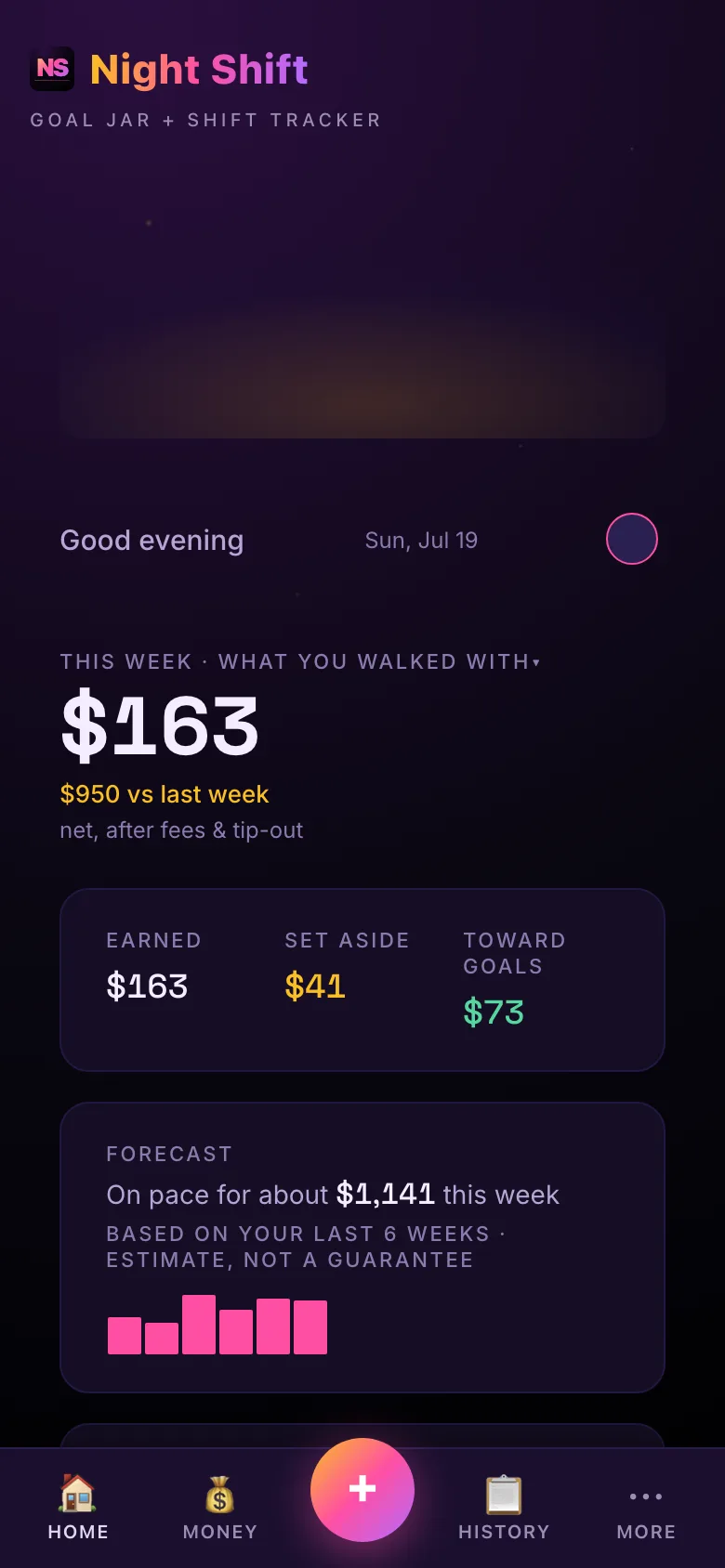
Night Shift automatically gives variable income earners what payroll quietly does for salaried workers:

  • A clear earnings number — what you actually walked with, every shift
  • A tax set-aside that fills before you decide to spend it
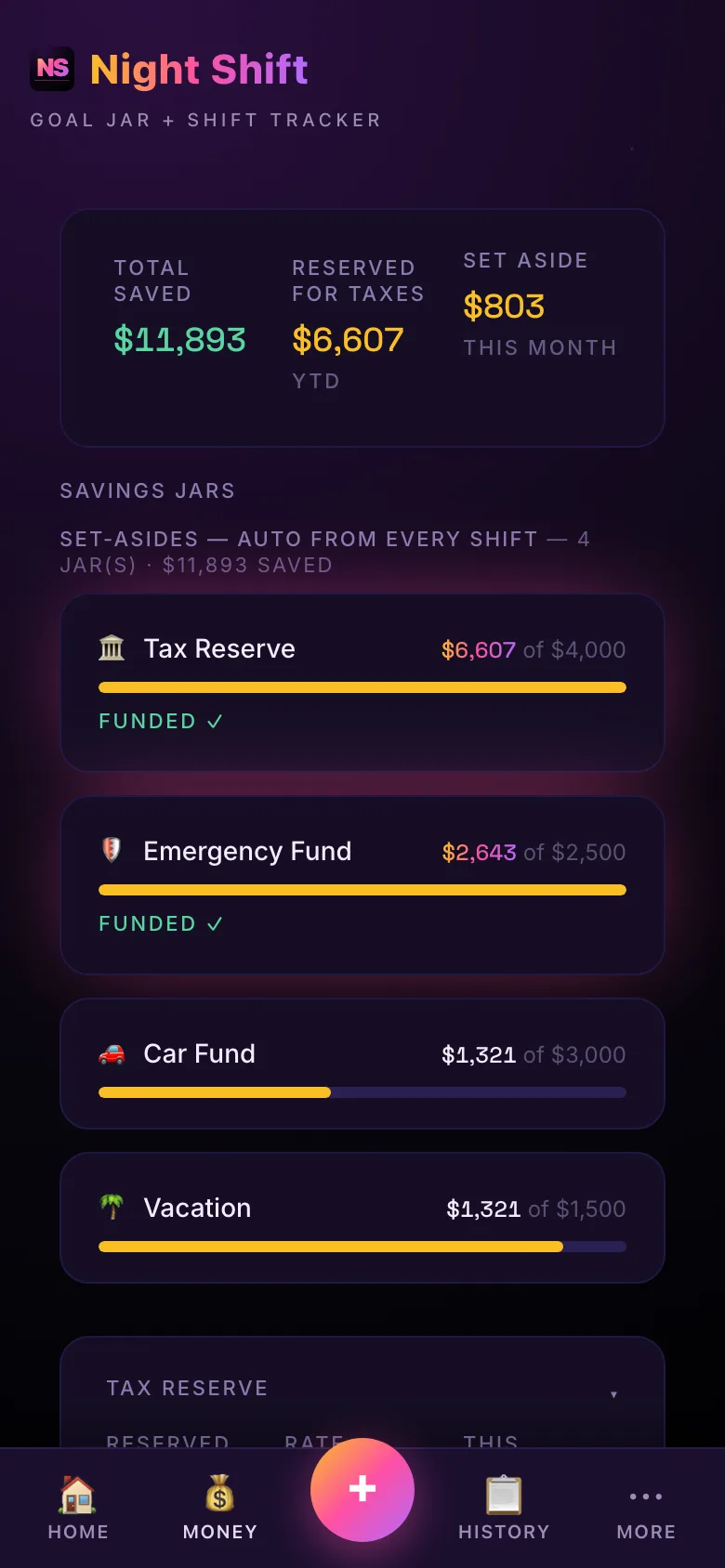
  • Savings buffers for goals, slow season, and expenses — building automatically
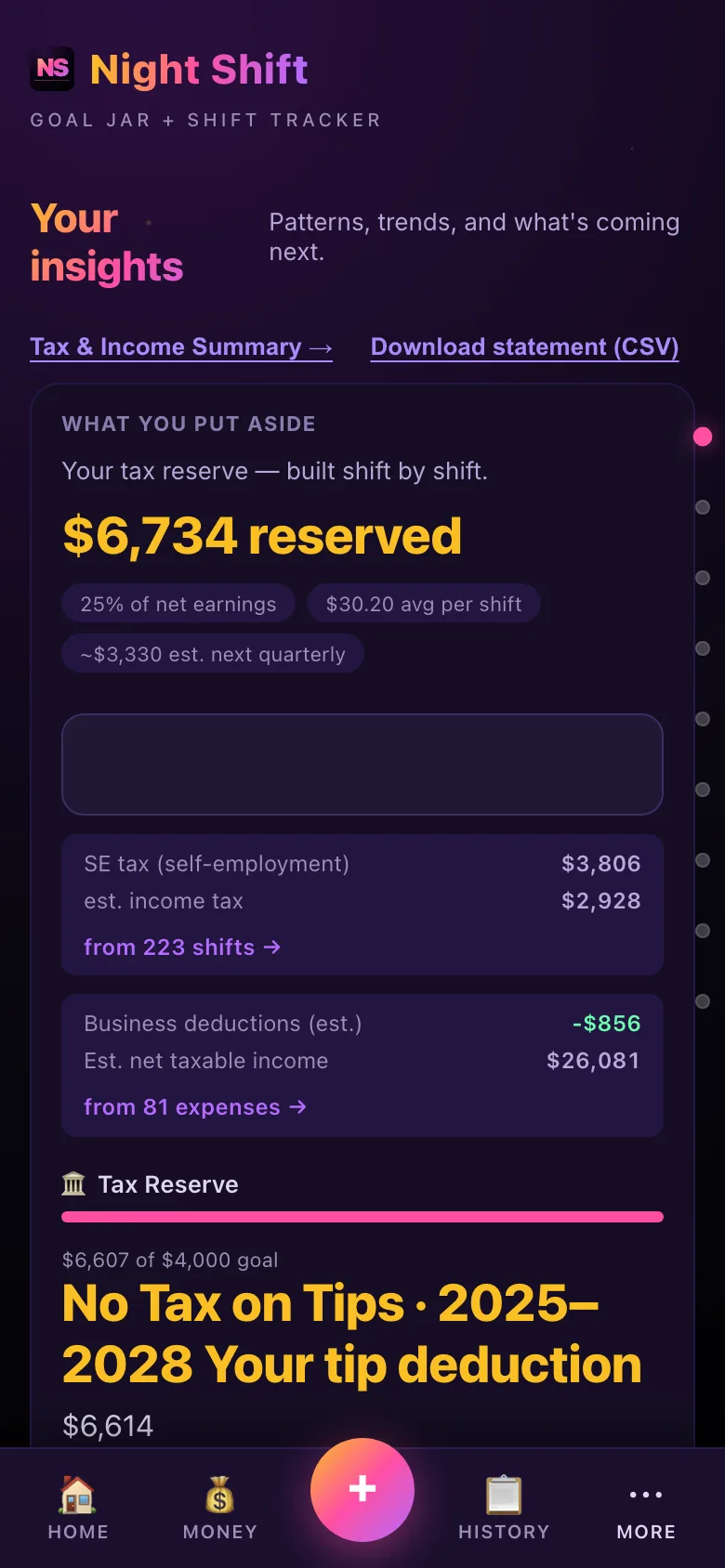
Earn tips? Up to $25,000 of qualified tips may be deductible on your federal return (2025–2028) — Night Shift keeps the dated records you'd need. →

Where do you track your shifts right now?

30-day free trial. Card isn't charged until the trial ends. Cancel in two taps — no subscription trap, ever.

Built for
Built for people paid in tips and shifts — tap your work to see exactly how Night Shift helps.

The financial control your bank app was never going to give you
🧾 No Tax on Tips

Built for the 'No Tax on Tips' deduction

Eligible tipped workers can deduct up to $25,000 of qualified tips from federal income (2025–2028) — but the deduction is only as good as your records. Night Shift logs your tips shift by shift, so you keep the dated, contemporaneous total you need to claim it with confidence.

💰 Goal Jars

Take care of yourself first — automatically

Every shift you log tracks your savings — the way a payroll team would, if you had one.

📋 Shift Tracker

Know what your time is actually worth

An hour of your time has a real dollar value — after tip-outs, after platform fees, after gas, after the roughly 25% that often goes toward taxes for self-employed workers (an estimate — your actual rate varies). Night Shift shows you that number so you can negotiate, pick the right shifts, and walk away from work that isn't paying what you're worth. Cash tips included — log exactly what you walked with.

📊 Earnings Trends

A track record you own

Export a CSV for tax season or other purposes. The receipts of a real income — yours — while the math is done for you and you can see your progress visually.

A few quick questions. A totally different app by the end.

Most money apps treat a dancer, a rideshare driver, and a bartender the same. We don't. Your answers shape every copy line, every category, every default — before you ever log a shift.

Where you work
Tailors location suggestions, expense categories, and coaching tips to your actual work.
How often you work
Powers your goal forecast — how many shifts a week, plus hours per shift if you drive.
Your typical shift
Drives a live forecast: "you'll hit your goal in N months at this pace."
Your goal
Seeds your first savings jar so day one already shows your number.
Take the 60-sec fit test →

Three tools. Real numbers for your work.

Try the calculator built for shift work — no sign-up required, runs right here in your browser.

Rideshare & Delivery

For Uber, Lyft, DoorDash, Instacart

Mileage deduction, fare breakdowns, tax set-aside math — built for the gig stack.

Loading calculator…

Restaurants & Hospitality

For servers, bartenders, line cooks, hosts

Tip pool tracking, cash vs card, slow-season buffer — front and back of house.

Loading calculator…

Other Service-Industry Pros

For dancers, salon workers, contractors, and everyone else

The original Night Shift. Universal jar system, shift tracking, weekly income reports.

Loading calculator…

Up and running in under 60 seconds. Then you're paying yourself, every shift.

Download or open in your browser

Night Shift works on any phone — add it to your home screen and it works offline like an app. No app store, no password to create. Sign in with email or Google when you want encrypted backup.

Set your first goal in under 60 seconds

Name it, pick an amount, pick an emoji. Your first goal jar is live. That's the whole setup.

Log a shift. Take care of yourself like a paycheck.

Enter your hours and earnings. Night Shift tracks the savings: tax reserve gets its cut, your goal jars get theirs, your slow-season buffer fills, and the rest is yours. Every shift logged in 30 seconds — plus a journal to keep track of your important work-related notes.

Simple pricing. No surprises.

Free trial first. Cancel before it ends — no charge, no questions.

First year deal
Standard Annual
$99.99/yr
Year 1: $99.99 · then $149.99/yr · cancel anytime
  • Free trial — no charge until it ends
  • Unlimited savings jars with auto-split from every shift
  • Multi-gig support — track unlimited income sources, each with its own pay rate
  • Shift tracker + CSV export — yours to keep, share, or hand to a CPA
  • Tax snapshot with quarterly set-aside calculator and live tax-reserve estimate
  • Insights dashboard — best night, top hour, monthly trends, year-to-date totals
  • Pattern unlocks at 5, 10, 15, 20, and 30 shifts
  • Goal tracking — set a target, see weeks to reach it at your pace
  • Spend tracking — log gas, fees, deductibles per shift; net is computed live
  • Built-in calculators — rideshare net, restaurant take-home, 1099 set-aside
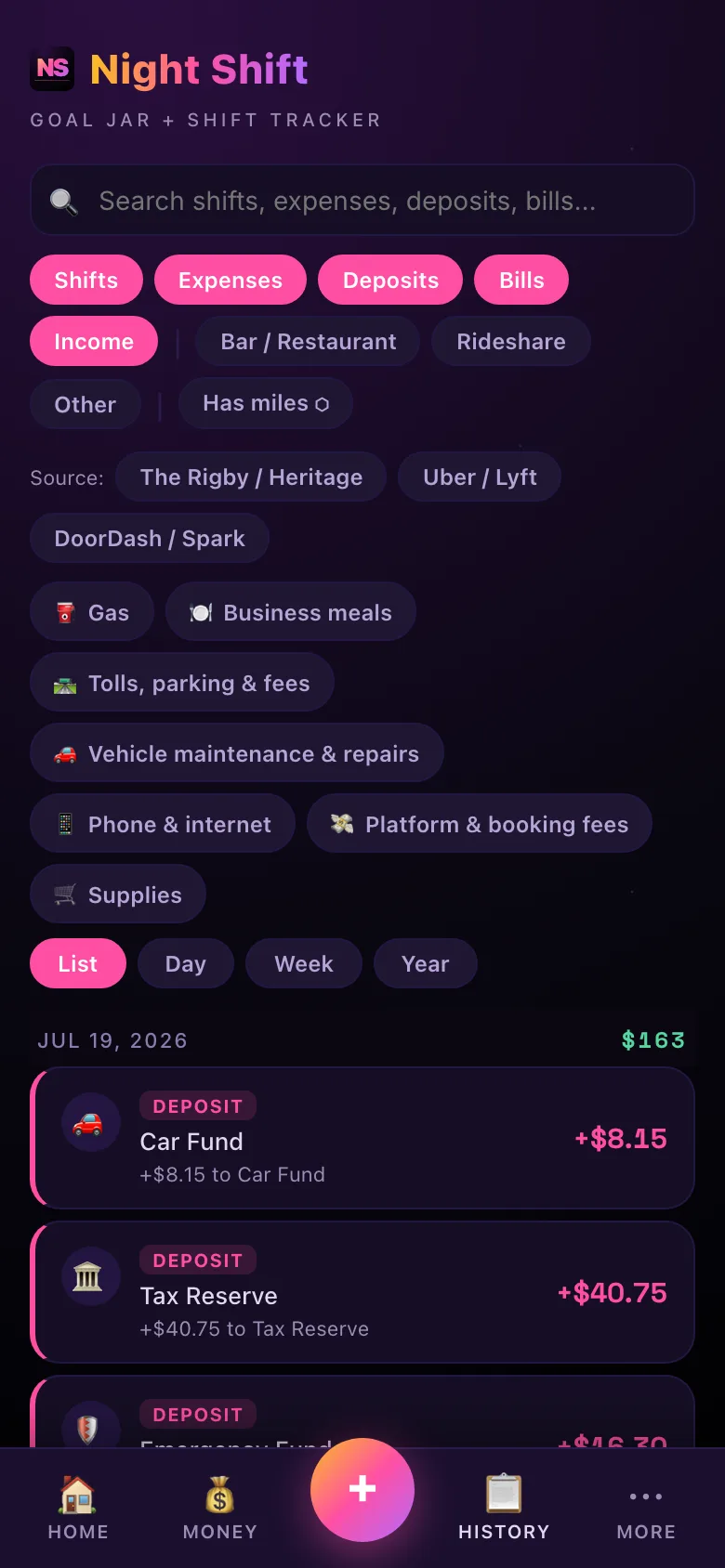
  • History tab — search, filter, and edit any past shift, expense, or deposit
  • Encrypted cloud backup — switch phones without losing a year of work
  • Account-light — magic-link or Google sign-in, no passwords, no third-party trackers
  • Bilingual — every screen and email in English and Spanish
Stop guessing. Start tracking. →
Night Shift is built by one founder — me, Cruz, in Madison, WI. It's English and Spanish from day one. Founding members get a direct line: every reply comes from me.

Cancel anytime in two taps. Your card is collected upfront but never charged until the trial ends. Year 2 and beyond renews at $149.99/yr. Privacy-first: by default your data stays on your phone, and the optional cloud backup is encrypted (AES-256) and stored as ciphertext on our servers.

Frequently Asked Questions

Is the trial really free?
At least 30 days free — your card isn't charged until your trial ends, and your exact trial length is shown on the paywall when you sign up. Cancel anytime in Settings before then and you owe nothing. You'll also get a reminder email before any charge hits.
Can I cancel anytime?
Yes. Settings → Subscriptions opens the Stripe billing portal. Cancellation takes effect at the end of your current billing period — no clawback, no questions.
Does Night Shift help with the 'No Tax on Tips' deduction?
Yes — by keeping the records you need to claim it. The federal 'No Tax on Tips' deduction (2025–2028) lets eligible tipped workers deduct up to $25,000 of qualified tips from their federal income, whether or not they itemize. But to claim it, you need a contemporaneous log of what you actually earned in tips. Night Shift captures your cash tips on every shift, so at tax time you have the dated, exportable record to back it up. It applies to federal income tax only (not FICA or state), income limits apply, and this isn't tax advice — check your specifics with a tax pro.
Does my data leave my phone?
By default, no. Night Shift is offline-first — everything you log lives in your phone's local storage. Paid plans optionally enable encrypted cloud sync of your earnings data, so it survives losing your phone or upgrading devices. Subscription status is always handled by our payment processor (Stripe). To enable encrypted sync, sign in with your email (magic link) or Google — no password required. Your earnings stay local until you turn on cloud backup.
What's included in Standard?
Standard gets you the full app — goal jars, shift tracking, CSV export, calculators, and earnings reports. As you log shifts, the app shows you in real time how much to set aside for taxes — and how many shifts cover the cost of Night Shift itself. That's everything you need to manage irregular income. There is no Premium tier — Standard is the whole app.
What if my work doesn't fit "Rideshare" or "Restaurants"?
Pick "Other service-industry pros" — the default room covers dancers, salon workers, contractors, delivery, and anyone else who works for themselves. Your jars, shift tracking, and earnings reports all work the same way regardless of vertical. And if you work multiple gigs — bartend AND drive rideshare, for example — Night Shift tracks all of them together.

Not sure which tracker fits your work? See how Night Shift compares: vs Everlance, vs Stride, vs a spreadsheet.

Can I track multiple gigs at once?
Yes — that's a core feature. Add as many income sources as you have (e.g. bartender at Maggie's + Uber on weekends + occasional salon shifts). Each gig gets its own pay rate (per shift or per hour), shift count, and hours per shift. The app rolls everything up into one weekly and monthly forecast, and you can edit any source anytime in Settings → Sources.
What if my hours and earnings are irregular?
That's the whole reason Night Shift exists. The "Realistic annual range" view on signup lets you tweak a fluctuation slider (slow weeks vs. peak weeks) so you see the low and high bounds — not a pretend average that ignores reality. As you log shifts, the app learns your actual variance and surfaces patterns at 5, 10, 15, 20, and 30 logged shifts (best night, peak hour, monthly trend, etc.).
How does the tax set-aside work?
Night Shift automatically reserves a percentage of every shift's net pay (default 25% for self-employed; 20% for restaurant W-2 + tip work — both editable in Settings). The reserved amount lands in a Tax Reserve jar that updates live as you log shifts. Built-in 1099 quarterly calculator helps you decide what to send to the IRS each quarter. The app doesn't file taxes for you — it makes April predictable instead of a panic.
Can I edit a shift after I've logged it?
Yes. The History tab lets you search, filter, and edit any past shift, expense, or deposit. Tap a shift to update gross, fees, hours, source, or notes — the app recalculates net and tax reserve automatically. Same for expenses (gas, fees, deductibles) and deposits.
What happens to my data if I switch phones?
On a paid plan, your earnings are backed up to our cloud, encrypted with AES-256 and stored as ciphertext on our servers. Sign in on the new phone with magic link or Google and your data restores in seconds. The free trial period also gets cloud backup so you don't lose any setup work. Your subscription is tied to your email, so a lost phone never costs you a year of records. On the free tier, nothing leaves your phone — cloud backup is opt-in and only runs on a paid plan.
Do I have to log every single shift?
For tax accuracy, yes — but the logging itself takes about 30 seconds per shift. The home screen has a one-tap log button that pre-fills your most-recent source, date, and a sensible gross. You can also backfill up to 5 past shifts during onboarding to get insights faster. The app is designed for a quick after-shift check-in, not a chore.
Does this replace my accountant or my bookkeeper?
No. Night Shift is a tracking and forecasting tool — it shows you what you're earning, what to set aside, and what your real $/hour is. At tax time, hand the CSV export to your CPA or load it into TurboTax / FreeTaxUSA. We make April easier; we don't file your return.
Is there a free tier?
Every account starts with a free trial — at least 30 days, sometimes 60 or 90 depending on your cohort. After that, Standard ($99.99 first year, $149.99/yr standard) unlocks the full app. There's no permanent free tier — but the trial gives you full access with cloud backup so you can confidently decide.
What's the difference between gross and net?
Gross = what you pulled before any deductions (cash + tips + base + bonuses). Net = gross minus your fees (tip-out, platform commission), expenses (gas, deductibles), and tax set-aside. Night Shift computes net for you in real time as you log each shift, so you always see the real number — not the platform's misleading "earnings" total.
Is the app available in Spanish?
Yes. Every screen, every email, and every notification is fully translated. Pick your language on the first onboarding screen, or change it later in Settings.